monitoring salesforce using a SOQL query with power automate
this shows how to use the ‘execute a soql query’ action in power automate to simply monitor for exceptions or issues in salesforce. this action gives you much more flexibility than the get records salesforce connector, which can only hit a single object.
overview
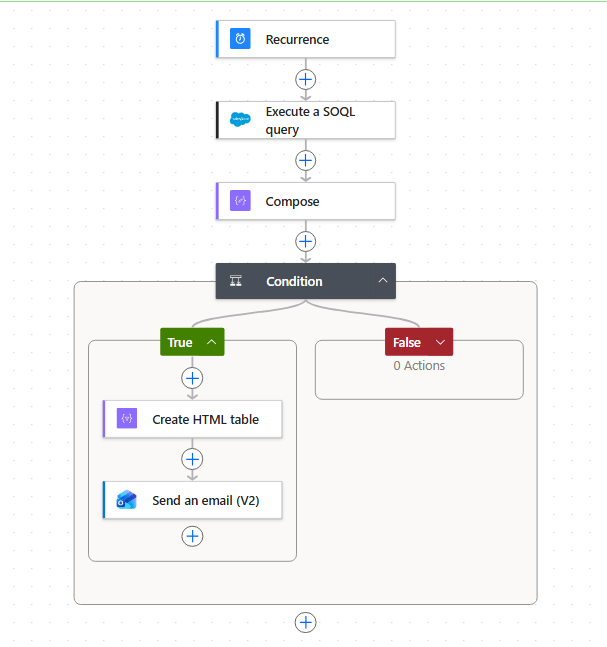
components
recurrence: standard - set the frequency etc
execute soql query: write pure soql - not the odata format that is used in the get salesforce records power automate connector. LAST_N_DAYS works - which can be helpful for monitoring purposes
compose: to count the number of records returned. you have to manually add [‘Records’] after inserting the dynamic content
length(body('Execute_a_SOQL_query')['Records'])
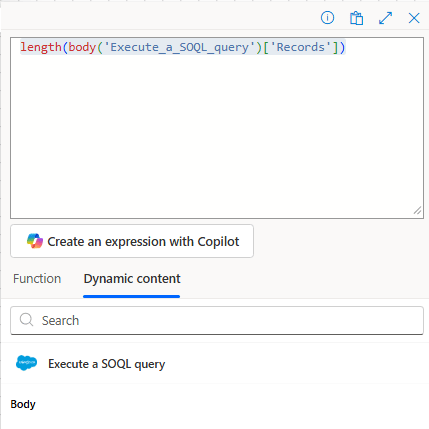
condition: evaluate the number of records returned and decide which path to follow
create html table: convert the output to html for inserting into an email. same content as the compose above, just minus the length()
body('Execute_a_SOQL_query')['Records']
send an email: share a message via smoke signals, carrier pigeons, or whatever means you can conjure up
the output of the html table is a bit primitive but its good enough. you can select specific columns in the component easily enough. its primarily cross object field references that come through a bit funny, i’m sure queries with child objects would be interesting also. good enough for my needs.
